---
title: "Customizing Card Layout"
slug: "customizing-card-layouts"
description: "Create mini cards with key details and configure displayed information as needed."
updated: 2024-08-09T11:03:08Z
published: 2024-08-09T11:03:08Z
canonical: "support.xyicon.com/customizing-card-layouts"
---
> ## Documentation Index
> Fetch the complete documentation index at: https://support.xyicon.com/llms.txt
> Use this file to discover all available pages before exploring further.
# Customizing Card Layout
Xyicon Administrators
Use this article to learn how to customize the card layout.
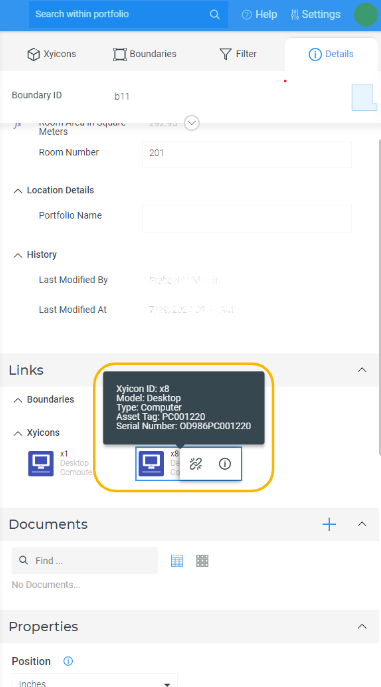
The card layout is available for each type within every module. A card is a method of displaying information associated with an object. Cards are used in instances such as portfolio-wide searches and displaying linked objects in a space editor view. Cards can display three fields in the tooltip, with an additional three fields available for display upon hovering over the card.
By default, a card contains three system-generated fields and also allows users to customize the card layout by selecting the fields they want to be displayed on the card. By customizing card layouts, users can display the most relevant information of each type, making it easier to identify objects.
## Before you begin
- Only **Xyicon Administrator** can customize the card layout in **Portfolio,** **Space, Catalog, Xyicon,** and **Boundary** modules.
---
Steps
1. On the header**,** click **Settings** **( )**.
2. Navigate to the **Modules** section in the side panel and select the module you want to customize the card layout.
3. Go to the **Types** tab and click on the relevant type.
4. Scroll down to find the **Customize Card Layout** section from the side panel **Details** **( )** tab..png)
5. Use the dropdown list to select the fields that you want to be displayed in the rows of the card.
The screenshot below shows how it reflects on the details tab in a space editor view.