---
title: "Deleting a Portfolio"
slug: "deleting-a-portfolio"
tags: ["SpaceRunner Portfolio"]
updated: 2024-09-06T08:21:57Z
published: 2024-09-06T08:21:57Z
canonical: "support.xyicon.com/deleting-a-portfolio"
---
> ## Documentation Index
> Fetch the complete documentation index at: https://support.xyicon.com/llms.txt
> Use this file to discover all available pages before exploring further.
# Deleting a Portfolio
Xyicon Users
Use this article to learn how to delete a portfolio from Xyicon permanently.
**CAUTION:** Deleting a portfolio removes all spaces, xyicons, and boundaries that are associated with it. Once you delete a portfolio, the action cannot be undone.
## Before you begin
Make sure that your **Xyicon User** has the necessary permissions to delete portfolios. User Permissions are managed by your organization's **Xyicon Administrator**.
---
## Steps
1. Go to **Main** **Menu** ( ) **>** **PORTFOLIOS**.
2. Select the checkboxes against the portfolios you want to delete.
**TIP:** If the portfolio you want to delete is not visible, check that you are on the correct **View**.
3. Click the **Delete** button ( ) on the **Action Bar**. You will be prompted to confirm the number of portfolios to be deleted.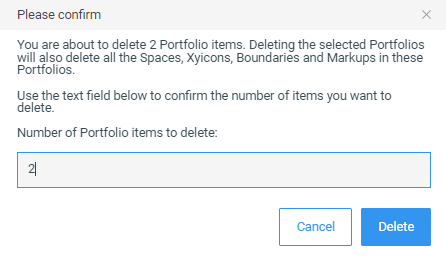
4. Enter the number that is displayed in the text field to enable the **Delete** button. If you want to change the number, click **Cancel**, and repeat steps 2 and 3.
5. Click **Delete**.
## Related
- [Creating a Portfolio](/creating-a-portfolio.md)