---
title: "Unplotting a Xyicon from a Space"
slug: "unplotting-a-xyicon-from-a-space"
description: "Learn how to unplot a xyicon from your space in Xyicon. Manage unplotted xyicons in the Unplotted Xyicon panel, replot them, or delete them when needed."
updated: 2024-12-09T05:39:23Z
published: 2024-12-09T05:39:23Z
canonical: "support.xyicon.com/unplotting-a-xyicon-from-a-space"
---
> ## Documentation Index
> Fetch the complete documentation index at: https://support.xyicon.com/llms.txt
> Use this file to discover all available pages before exploring further.
# Unplotting a Xyicon from a Space
Xyicon Users
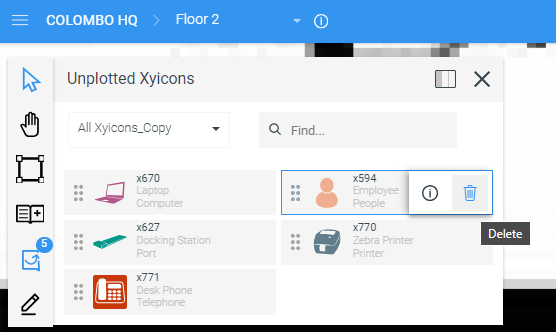
Use this article to learn how to unplot one or more xyicons currently plotted on a space in the [**Space Editor**](/v1/docs/about-the-space-editor). When you unplot a xyicon, you are temporarily removing the xyicon from a space and putting it away in the **Space Editor**'s **Unplotted Xyicons** panel for later use on any space within the same portfolio.
You can also [create unplotted xyicons from scratch](/v1/docs/creating-an-unplotted-xyicon-in-the-xyicons-module), which are automatically uploaded to the same panel.
## Before you begin
Ensure that your **Xyicon User** has the necessary permissions to view and update spaces and xyicons. User Permissions are managed by your organization's **Xyicon Administrator**.
---
## Unplot a Xyicon
1. [Open your space in the **Space Editor**](/v1/docs/opening-your-space-in-the-space-editor) and select one or more xyicons that you want to unplot.
2. Click the **More** icon (
) on the **Action Bar**, then click **Unplot** (
) to unplot the selected xyicons.
Your xyicons will be moved to the **Unplotted Xyicons Panel**.
**CAUTION:** Unplotting and replotting a Xyicon in a different space is not equivalent to moving it, as this process will result in the loss of all existing links to that Xyicon. Although the Xyicon's details remain unchanged, this action can disrupt many functionalities.
**TIP:** If you want to move a Xyicon from one space to another space without unlinking everything, you can simply cut (Ctrl+X) the Xyicon from the current space, and paste (Ctrl+V) it on another space.
[Video](https://cdn.document360.io/d689d9b5-af1b-4ba8-a27d-d8cad72c9618/Images/Documentation/unplot%20xyicons.mp4)
---
## Plot an Unplotted Xyicon back on a Space
1. [Open your space in the **Space Editor**](/v1/docs/opening-your-space-in-the-space-editor). If you are already on the **Space Editor**, use the **Space Selector** field on the Xyicon **Header** to switch to the correct space.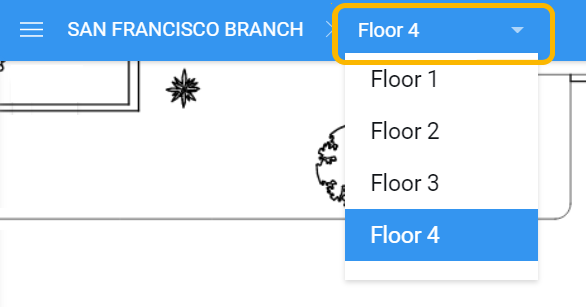
2. Next, open the **Unplotted Xyicons** panel (
) from the toolbar.
**TIP:** Click the **Dock Unplotted Xyicons** button (
) located at the top of the panel to dock it for easy access.
3. Drag and drop the desired xyicon to the space. **Note:** To drag and drop multiple xyicons, hold down the **Ctrl/Cmd** key when selecting your xyicons.
[Video](https://cdn.document360.io/d689d9b5-af1b-4ba8-a27d-d8cad72c9618/Images/Documentation/plot%20unplotted%20xyicons.mp4)
---
## Delete an Unplotted Xyicon
**CAUTION:** Deleting an unplotted xyicon removes all data associated with it. Once you delete an unplotted xyicon, the action cannot be undone.
1. [Open your space in the **Space Editor**](/v1/docs/opening-your-space-in-the-space-editor) and open the **Unplotted Xyicons** panel (
) from the toolbar.
2. Hover over an unplotted xyicon and click **Delete** (
). You will be prompted to confirm the action.
3. Click **Yes** to delete the unplotted xyicon.