---
title: "Duplicating a Portfolio"
slug: "duplicating-a-portfolio"
description: "Easily duplicate Portfolios in Xyicon to replicate project structures, save time, and streamline your workflow for greater efficiency."
updated: 2024-12-18T07:12:16Z
published: 2024-12-18T07:12:16Z
canonical: "support.xyicon.com/duplicating-a-portfolio"
---
> ## Documentation Index
> Fetch the complete documentation index at: https://support.xyicon.com/llms.txt
> Use this file to discover all available pages before exploring further.
# Duplicating a Portfolio
Xyicon Administrators
Use this article to learn how to create new portfolios by duplicating an existing one in the **PORTFOLIOS** module. Duplicating a portfolio also duplicates all spaces, xyicons, boundaries, links, and markups that belong to it.
## Before you begin
Make sure you have set up the following under Xyicon **Settings** ( ):
- Portfolio Types, Portfolio Fields, and Portfolio Layouts module settings for the **Portfolio** module.
- Relevant permission sets for the users in your Xyicon organization.
---
## Steps
1. Go to **Main Menu ( ), PORTFOLIOS**.
2. Select the portfolio you want to duplicate. You can only duplicate a single portfolio at a time.
3. Click the **Duplicate** button ( ) on the **Action Bar.****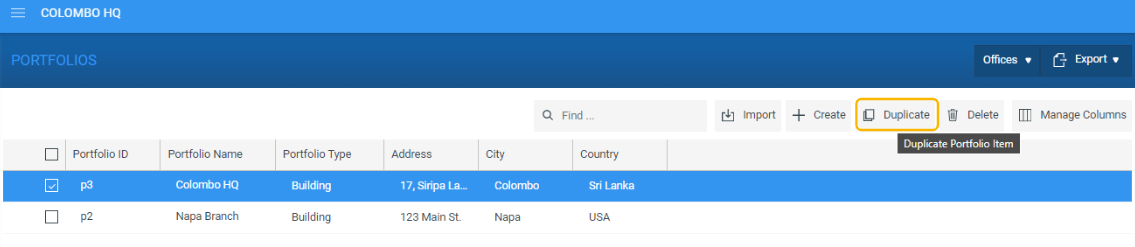**
4. You will be prompted to confirm the action.
5. Click **Yes** to duplicate the selected portfolio. The process may take a few minutes based on the number of objects that are duplicated.
6. Once the new portfolio is created, you can [rename it](/v1/docs/updating-portfolios#rename-a-portfolio) and [update relevant details](/v1/docs/updating-portfolios#update-a-single-portfolio).
7. Next, optionally [add the portfolio to a portfolio group](/v1/docs/creating-a-portfolio#step-2-optional-add-portfolio-to-portfolio-group).
8. Finally, [assign the duplicated portfolio to users](/v1/docs/creating-a-portfolio#step-3-assign-new-portfolio-to-users).